Metadata API Insights
Breadcrumbs

Metadata API for SAP BW


đź’ˇ This Confluence page provides the download an overview of how to interpret the Metadata API XML sample files extracted from an SAP BW system (referenced file names are highlighted in blue). You will also learn how the metadata is structured and how the technical relationships are represented across the files.

If you would like a guided walkthrough, you can schedule a session with one of our product experts here.


Download

You can download the sample files for SAP BW here:

MetadataAPI_Files_BWA4H.zip


File Interpretation

Buildup & Structure

đź’ˇ The Metadata API is capable of extracting BW objects such as reporting elements (Queries, key figures), Providers (CompositeProviders, ADSOs), and others. In addition to supplementary information, it also represents their technical structure in XML format.

General information about the BW objects, such as their structure, can be obtained from the following files:

Example: Query ZPURV01_REP_001 (UID 055QGZV4AT4XFZSRLRULRR4OO).

Information such as the technical name, descriptions and InfoArea can be found in the file “Details.A4H.xml”:

Show XML Snippet (Metadata API) - Details.A4H.xml
XML
<entity>
    <id>055QGZV4AT4XFZSRLRULRR4OO|REP</id>
    <technicalName>ZPURV01_REP_001</technicalName>
    <uid>055QGZV4AT4XFZSRLRULRR4OO</uid>
    <type>REP</type>
    <infoArea>ZMMPURV|AREA</infoArea>
    <descriptions>
      <description language="D" text="MM-PUR: Beschaffungswert Analyse" />
      <description language="E" text="MM-PUR: Procurement Value Analysis" />
    </descriptions>
  </entity>


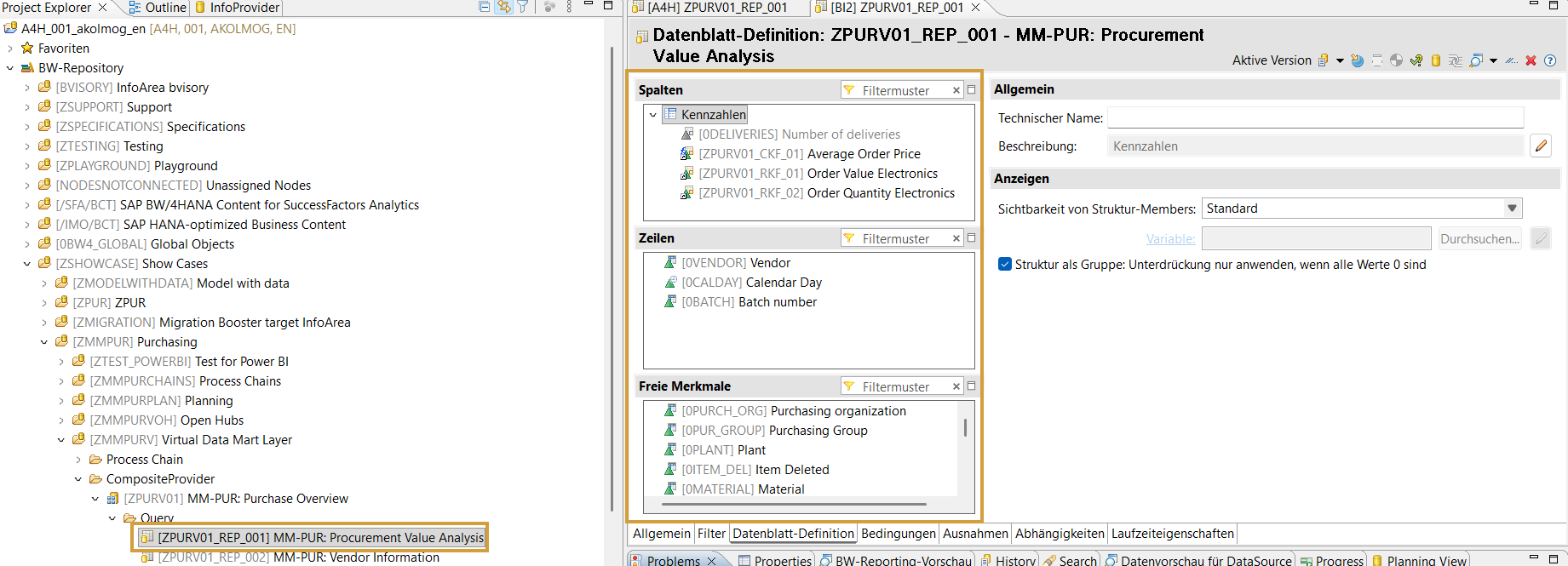
Here, you can see the buildup of the sample Query in Eclipse:

Show Query buildup (SAP)
image-20260218-101054.png


The build-up information of all objects can be found in the file “Buildups.A4H.xml” - here you can see this kind of information for the sample Query:

Show XML Snippet (Metadata API) - Buildups.A4H.xml
XML
  <node id="055QGZV4AT4XGFL1YQUULKE0G|055QGZV4AT4XFZSRLRULRR4OO|REP">
      <uid>055QGZV4AT4XGFL1YQUULKE0G</uid>
      <type>CKF</type>
      <isKey>false</isKey>
      <isNullable>false</isNullable>
    </node>
    <node id="055QGZV4AT4XGFL26GAVO356U|055QGZV4AT4XFZSRLRULRR4OO|REP">
      <uid>055QGZV4AT4XGFL26GAVO356U</uid>
      <type>RKF</type>
      <isKey>false</isKey>
      <isNullable>false</isNullable>
    </node>
    <node id="055QGZV4AT4XGFL2HQKIZCOBM|055QGZV4AT4XFZSRLRULRR4OO|REP">
      <uid>055QGZV4AT4XGFL2HQKIZCOBM</uid>
      <type>RKF</type>
      <isKey>false</isKey>
      <isNullable>false</isNullable>
    </node>
    <node id="0VENDOR|055QGZV4AT4XFZSRLRULRR4OO|REP">
      <technicalName>0VENDOR</technicalName>
      <dataType>CHAR</dataType>
      <length>10</length>
      <node id="0REGION|0VENDOR|055QGZV4AT4XFZSRLRULRR4OO|REP">
        <technicalName>0REGION</technicalName>
        <dataType>CHAR</dataType>
        <length>3</length>
      </node>
      <isKey>false</isKey>
      <isNullable>false</isNullable>
    </node>
    <node id="0CALDAY|055QGZV4AT4XFZSRLRULRR4OO|REP">
      <technicalName>0CALDAY</technicalName>
      <dataType>DATS</dataType>
      <length>8</length>
      <isKey>false</isKey>
      <isNullable>false</isNullable>
    </node>
    <node id="0BATCH|055QGZV4AT4XFZSRLRULRR4OO|REP">
      <technicalName>0BATCH</technicalName>
      <dataType>CHAR</dataType>
      <length>10</length>
      <isKey>false</isKey>
      <isNullable>false</isNullable>
    </node>


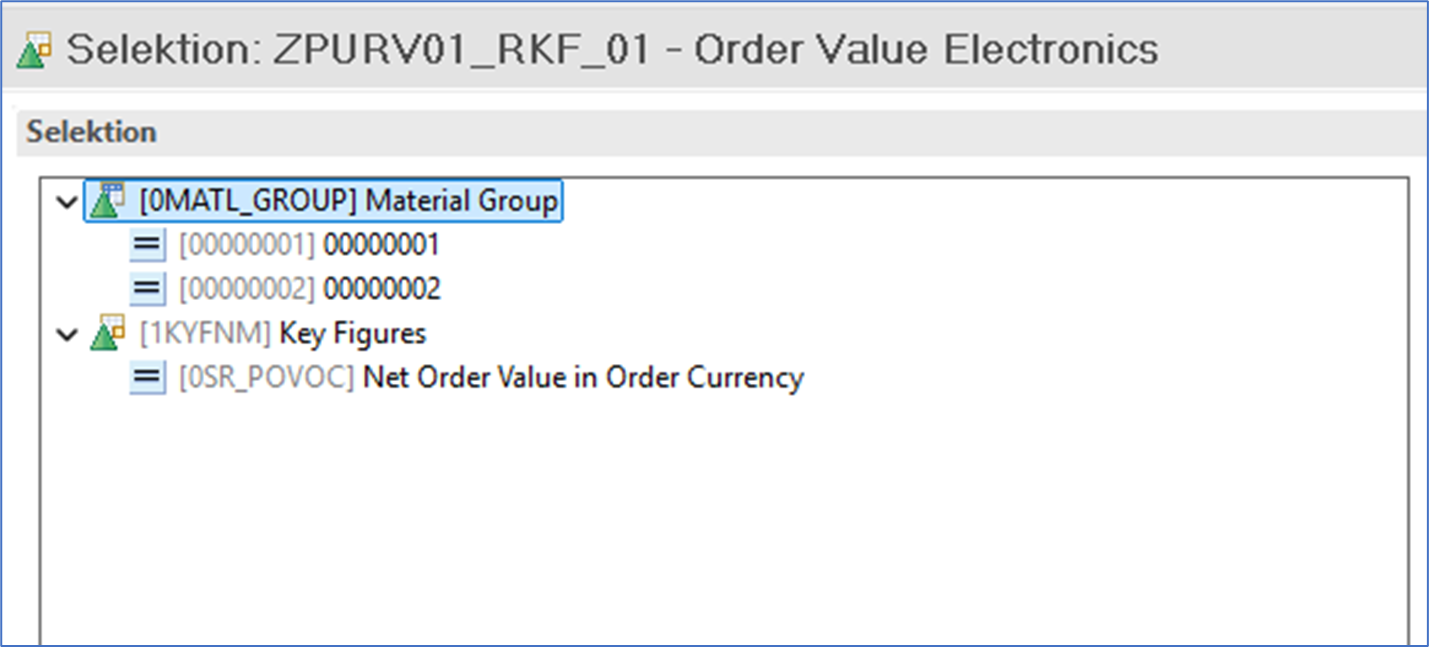
In the same file (“Buildups.A4H.xml”), the definitions of Key Figures (formulas, selections) can also be checked - e.g., for the selections of the restricted Key figure “ZPURV01_RFK_01 (UID: 055QGZV4AT4XGFL26GAVO356U)”:

Show Key Figure definition (SAP)
image-20260218-102618.png


Here, you can see how we display this kind of information in the “Details.A4H.xml” file:

Show XML Snippet (Metadata API) - Details.A4H.xml
XML
<parent xsi:type="Buildup" id="055QGZV4AT4XGFL26GAVO356U|RKF">
    <node id="0MATL_GROUP|055QGZV4AT4XGFL26GAVO356U|RKF">
      <technicalName>0MATL_GROUP</technicalName>
      <dataType>CHAR</dataType>
      <length>9</length>
      <node>
        <value>00000001</value>
        <operator>I_EQ</operator>
      </node>
      <node>
        <value>00000002</value>
        <operator>I_EQ</operator>
      </node>
      <isKey>false</isKey>
      <isNullable>false</isNullable>
    </node>
    <node id="0SR_POVOC|055QGZV4AT4XGFL26GAVO356U|RKF">
      <technicalName>0SR_POVOC</technicalName>
      <dataType>CURR</dataType>
      <decimals>2</decimals>
      <isKey>false</isKey>
      <isNullable>false</isNullable>
    </node>
  </parent>

info This is a restricted key figure in SAP BW that calculates the key figure 0SR_POVOC exclusively for material groups 00000001 and 00000002.


The descriptions of the fields can be checked in the file “BuildupDescriptions.A4H.xml” - e. g., for the Calculated Key Figure “055QGZV4AT4XGFL1YQUULKE0G|055QGZV4AT4XFZSRLRULRR4OO|REP”:

Show XML Snippet (Metadata API) - BuildupDescriptions.A4H.xml
XML
  <node id="055QGZV4AT4XGFL1YQUULKE0G|055QGZV4AT4XFZSRLRULRR4OO|REP">
    <description language="D" text="Durchschnittlicher Bestellpreis" />
    <description language="E" text="Average Order Price" />
  </node>


For more information on the buildup details, you can check out these articles in our documentation:


Lineage Information

đź’ˇ The Metadata API can generate XML files in GraphML format that visualize, at the object or field level, how elements are related to each other and how the mappings are defined.

Object Level Lineage

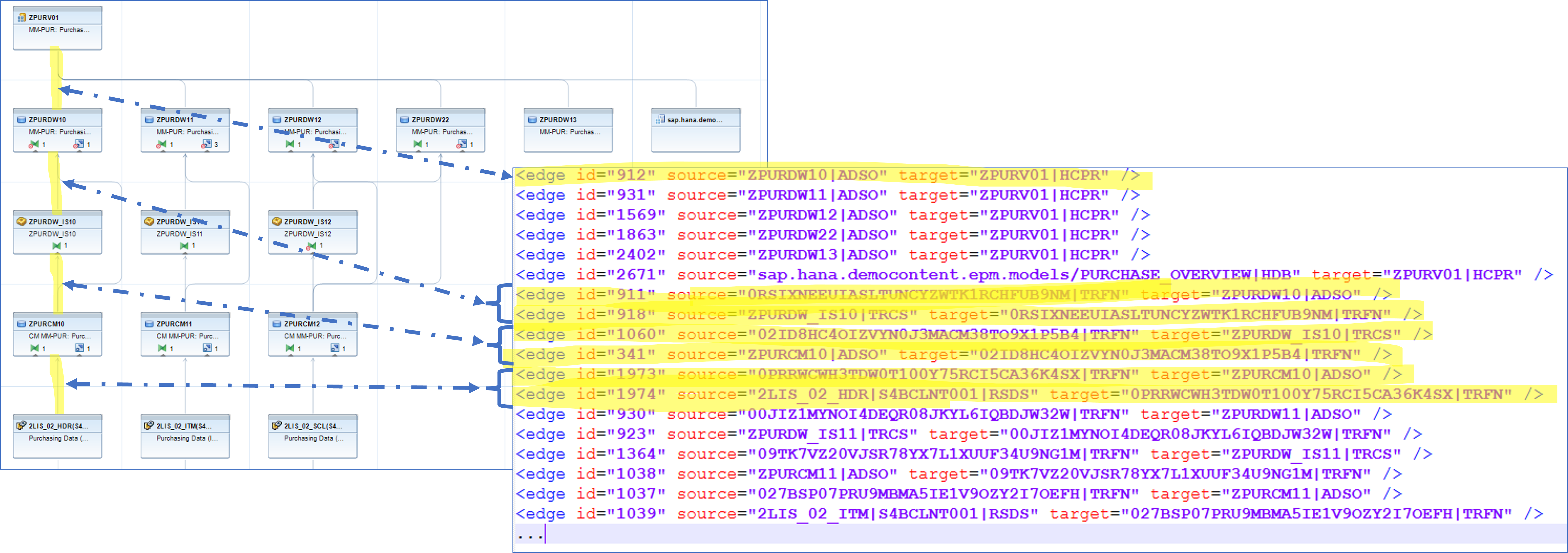
The file ”Relations.A4H.xml” shows the object-level lineage of the Composite Provider “ZPURV01”, which underlies the query “ZPURV01_REP_001 (UID 055QGZV4AT4XFZSRLRULRR4OO)”.

Show object-level lineage (SAP) and Relations.A4H.xml (Metadata API)
object_level_lineage.png


All extracted BW objects are initially listed as nodes:

Show XML Snippet (Metadata API) - Relations.A4H.xml
XML
<node id="ZPURV01|HCPR" />

<node id="055QGZV4AT4XFZSRLRULRR4OO|REP" />
<node id="055QGZV4AT4XFZSROPIFLIC93|REP" />
<node id="055QGZV4AT4XFZSRQOUSOGZGQ|REP" />
<node id="ZPURV02|HCPR" />

The edges show how the objects are related at the object level:

Show XML Snippet (Metadata API) - Relations.A4H.xml
XML
<edge id="872" source="ZPURDW10|ADSO" target="ZPURV01|HCPR" />
<edge id="890" source="ZPURDW11|ADSO" target="ZPURV01|HCPR" />
<edge id="1523" source="ZPURDW12|ADSO" target="ZPURV01|HCPR" />
<edge id="1816" source="ZPURDW22|ADSO" target="ZPURV01|HCPR" />
<edge id="2444" source="ZPURDW13|ADSO" target="ZPURV01|HCPR" />

<edge id="187" source="ZPURV01|HCPR" target="055QGZV4AT4XFZSRLRULRR4OO|REP" />
<edge id="188" source="ZPURV01|HCPR" target="055QGZV4AT4XFZSROPIFLIC93|REP" />
<edge id="189" source="ZPURV01|HCPR" target="055QGZV4AT4XGG6GAOJX71TOR|REP" />


info The snippet below clearly illustrates that the Composite Provider ZPURV01 serves as the source for the query ZPURV01_REP_001 (UID: 055QGZV4AT4XFZSRLRULRR4OO), while also acting as a target for other ADSOs (e.g., ZPURDW10).

Field Level Lineage

In the file "Buildups.A4H.xml", we have already seen that all fields of the object buildups are listed, including their technical metadata and properties.

For transformations — which play an important role in the context of field mapping — the file also provides relevant information (e. g., the RuleID), such as whether the logic represents a direct mapping, a formula, a start/end/field routine, a master data read, or a constant.

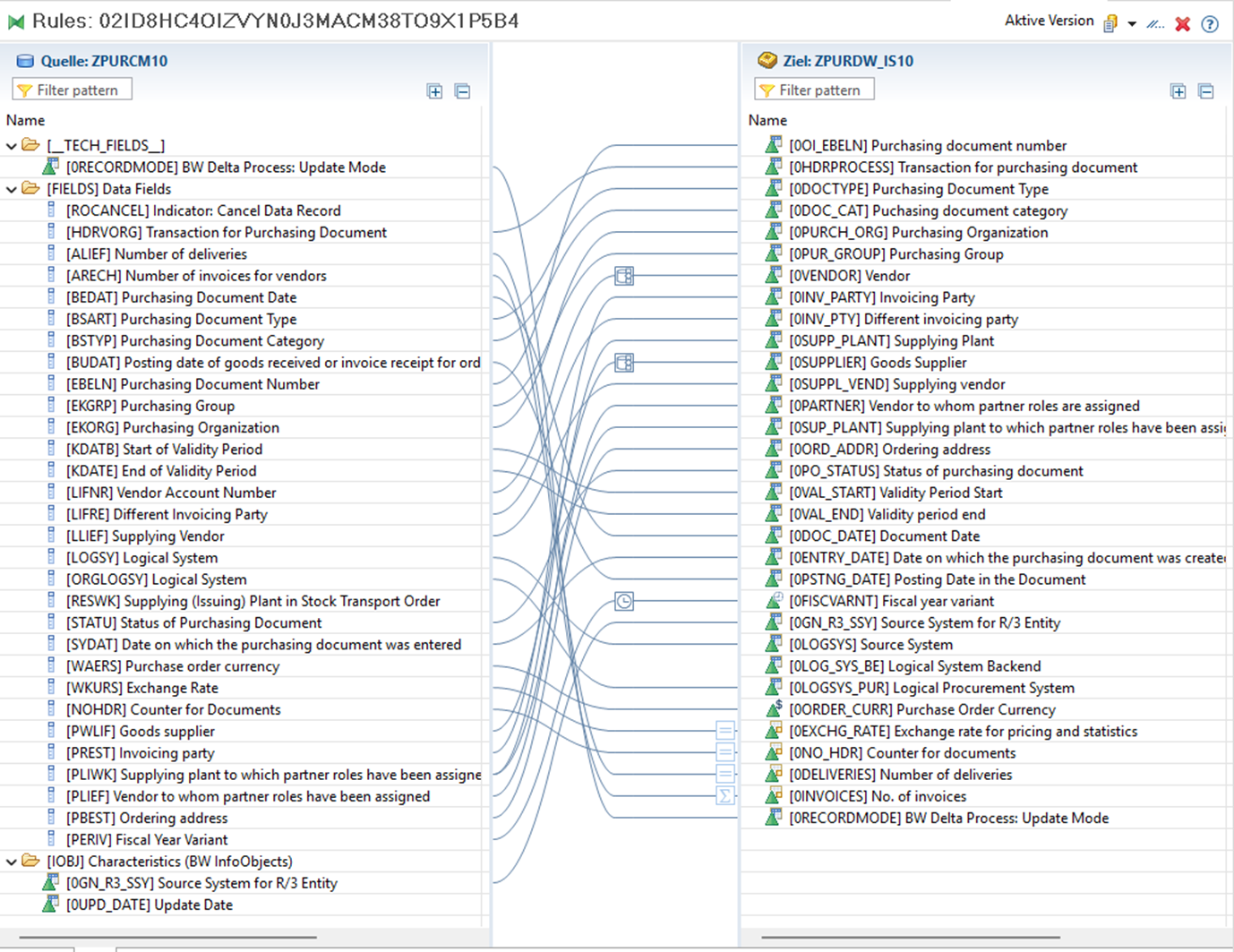
Below, the structure of a transformation is illustrated. First, you see a screenshot from SAP:

Show Transformation Mapping (SAP)
image-20260218-150126.png


Next, the corresponding representation in the Metadata API file "Buildups.A4H.xml" is shown:

Show XML Snippet (Metadata API) - Buildup.A4H.xml
XML
 <parent xsi:type="Transformation" id="02ID8HC4OIZVYN0J3MACM38TO9X1P5B4|TRFN">
    <node>
      <id>1|02ID8HC4OIZVYN0J3MACM38TO9X1P5B4|TRFN</id>
      <sapRuleID>1</sapRuleID>
      <type>DIRECT</type>
    </node>
    <node>
      <id>2|02ID8HC4OIZVYN0J3MACM38TO9X1P5B4|TRFN</id>
      <sapRuleID>2</sapRuleID>
      <type>DIRECT</type>
    </node>
    <node>
      <id>3|02ID8HC4OIZVYN0J3MACM38TO9X1P5B4|TRFN</id>
      <sapRuleID>3</sapRuleID>
      <type>DIRECT</type>
    </node>
    <node>
      <id>4|02ID8HC4OIZVYN0J3MACM38TO9X1P5B4|TRFN</id>
      <sapRuleID>4</sapRuleID>
      <type>DIRECT</type>
    </node>
    <node>
      <id>5|02ID8HC4OIZVYN0J3MACM38TO9X1P5B4|TRFN</id>
      <sapRuleID>5</sapRuleID>
      <type>DIRECT</type>
    </node>
    <node>
      <id>6|02ID8HC4OIZVYN0J3MACM38TO9X1P5B4|TRFN</id>
      <sapRuleID>6</sapRuleID>
      <type>DIRECT</type>
    </node>
    <node>
      <id>7|02ID8HC4OIZVYN0J3MACM38TO9X1P5B4|TRFN</id>
      <sapRuleID>7</sapRuleID>
      <type>DIRECT</type>
    </node>
    <node>
      <id>8|02ID8HC4OIZVYN0J3MACM38TO9X1P5B4|TRFN</id>
      <sapRuleID>8</sapRuleID>
      <type>ROUTINE</type>
    </node>
    <node>


The field-level mapping is represented in the file "Mappings.A4H.xml" in a similar way, using nodes (the fields/elements of the BW objects) and edges (the mapping relationships between these fields).

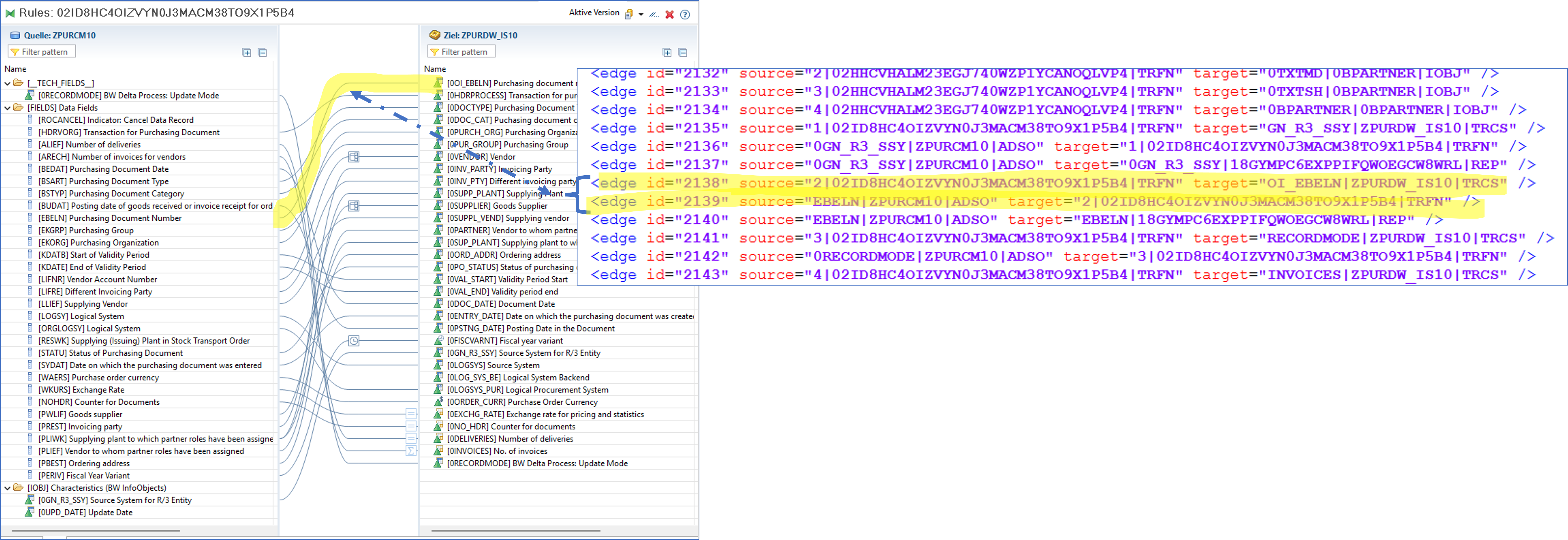
If it is a direct mapping, the Mapping is found in file ”Mappings.A4H.xml”

Show direct mapping of a Transformation (SAP) and Mapping.A4H.xml (Metadata API)
field_level.png


Show code snippet (Metadata API) - Mapping.A4H.xml
XML
<edge id="9687" source="2|02ID8HC4OIZVYN0J3MACM38TO9X1P5B4|TRFN" target="OI_EBELN|ZPURDW_IS10|TRCS" />
<edge id="9688" source="EBELN|ZPURCM10|ADSO" target="2|02ID8HC4OIZVYN0J3MACM38TO9X1P5B4|TRFN" />

info The target field 0I_EBELEN of the InfoSource ZPURDW_IS10 is mapped to the source field EBELN of the ADSO ZPURCM10 via a direct mapping within the transformation 02ID8HC4OIZVYN0J3MACM38TO9X1P5B4 (Rule Group=2)

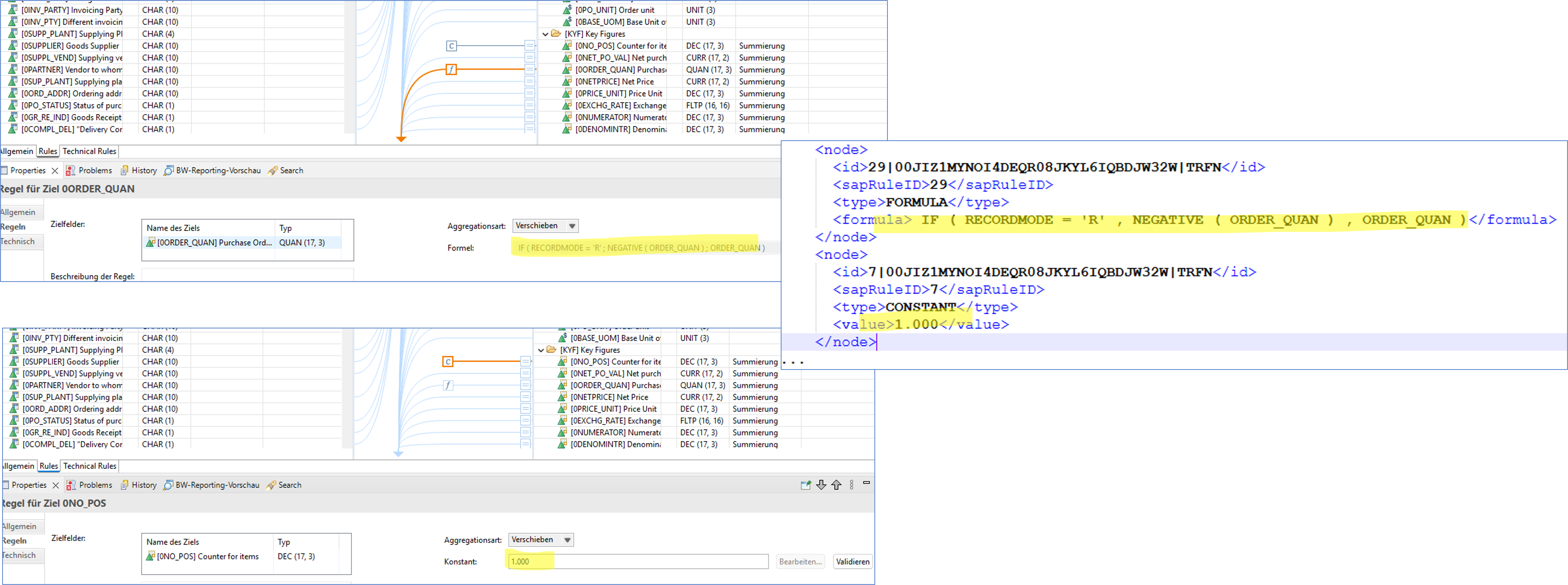
Further examples in the file "Buildups.A4H.xml" include constants or formulas that appear within the context of field mapping:

Show Constants & Formulas (SAP) and Buildups.A4H.xml (Metadata API)
constants_formulas_fieldmapping.png
Show XML Snippet (Metadata API) - Buildups.A4H.xml
XML
<node>
  <id>7|00JIZ1MYNOI4DEQR08JKYL6IQBDJW32W|TRFN</id>
  <sapRuleID>7</sapRuleID>
  <type>CONSTANT</type>
  <value>1.000</value>

<node>
  <id>29|00JIZ1MYNOI4DEQR08JKYL6IQBDJW32W|TRFN</id>
  <sapRuleID>29</sapRuleID>
  <type>FORMULA</type>
  <formula> IF ( RECORDMODE = 'R' , NEGATIVE ( ORDER_QUAN ) , ORDER_QUAN )</formula>
</node>


ABAP Coding

ABAP coding is also extracted via the Metadata API and presented in two files:

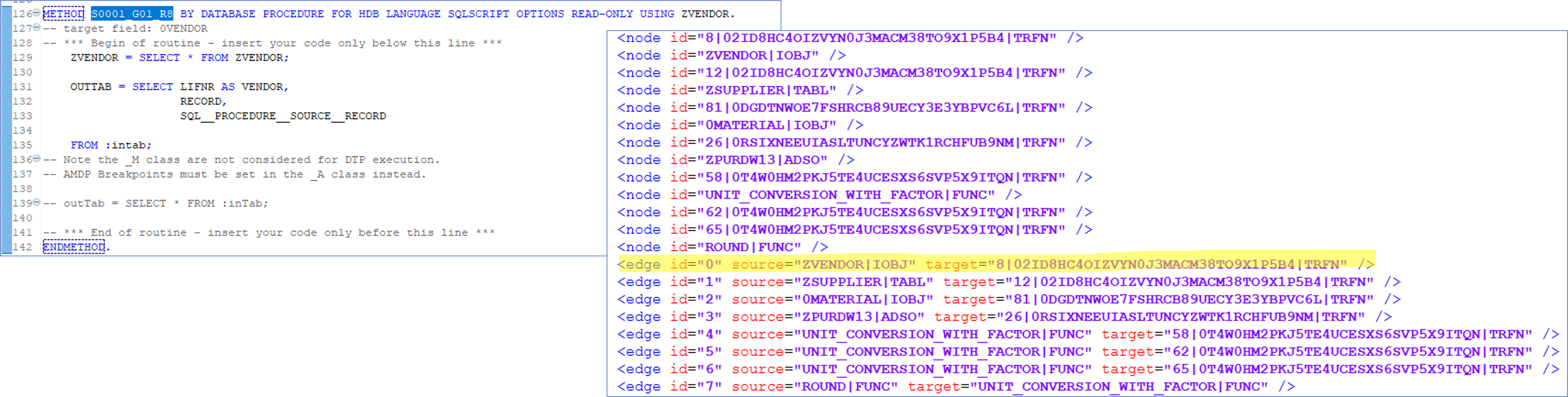
The relationships between code objects and tables/views are stored in the file ”ScanCode.A4H.xml” - e.g. for the Transformation “ 02ID8HC4OIZVYN0J3MACM38TO9X1P5B4”:

Show ABAP Coding (SAP) and ScanCode.A4H.xml (Metadata API)
abap_1.png

In this example, the table of the InfoObject ZVENDOR is referenced in the transformation coding 02ID8HC4OIZVYN0J3MACM38TO9X1P5B4.

As in the other files where relationships are represented, the relationship between the target (the transformation, including the rule group “8”) and the source (table ZVENDOR) is modeled via the edges:

Show XML Snippet (Metadata API) - ScanCode.A4h.xml
XML
<edge id="46" source="ZVENDOR|IOBJ" target="8|02ID8HC4OIZVYN0J3MACM38TO9X1P5B4|TRFN" />


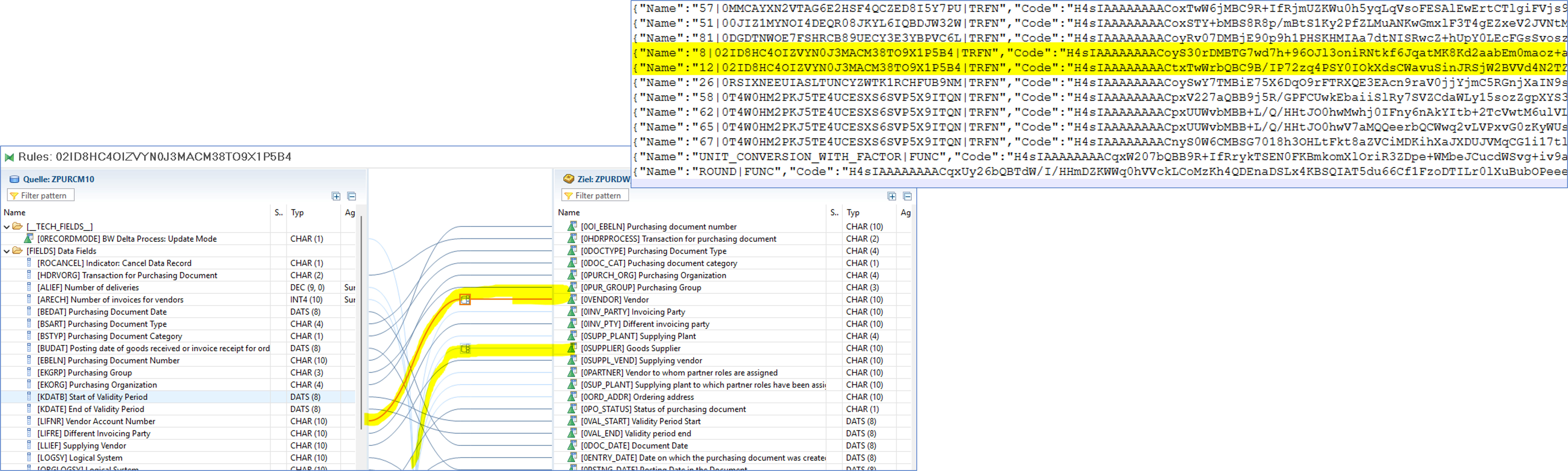
Further information regarding ABAP source code (e. g. Routines) is extracted and stored in the file ”Code.A4H.jsonl”:

Show Routine (SAP) and CodeA4h.jsonl (Metadata API)
abap_2.png


Show XML Snippet (Metadata API) - Code.A4H.jsonl
JSON
{"Name":"8|02ID8HC4OIZVYN0J3MACM38TO9X1P5B4|TRFN","Code":"H4sIAAAAAAAACoyS30rDMBTG7wd7h+96OJl3oniRNtkf6JqatMK8Kd2aabEm0maoz+aFj+QreNZORUUwEAI53zk53+/k7eV1KdK55NCTyeQkn9FWpwhW4CxlAdMCiZKh4JkSmEqFOQ8QsXiWsZmAvox0qBZJCpmkCxlrKMH4WMbRCplexDNcX4mYS3U8HIzH8EVzYzy2lanLM0z6UBcZjUYIzE1l4bZo3M5X1mCMyram8Xh2uwYbVxo4Wz9jbWr3CH9btaj3OkoeDkDr8BguoEUkwhQjTJVcftyfDwe9TmYpefuSRYtprMA0et1Rr/q5lAil4n8EiUSef5LKcy0zFdLZJ3083HVzVllfrKkZ8h07b8iJQb7Epi7aFkVjYJ0nu7atStOYElvXgKcJzJPZEBlne5psyRMEjSnuHhyVbHG/az3BQUuMiWRXlh3KEklvipIyu1winBbrX6CoNbruOB2GImz5v5FQk3sn32ZCNPvPdfwOAAD//wMA7Cu4DmcCAAA="}
{"Name":"12|02ID8HC4OIZVYN0J3MACM38TO9X1P5B4|TRFN","Code":"H4sIAAAAAAAACtxTwWrbQBC9B/IP72zq4PSY0IOkXdsCWavuSinJRSjW2BVVd4N2TZtvyyGf1F/oWI5dSAj00FMXxILmvZn3ZmZ/PT2vZLlUAmY2m13WC/705UfEtxBRGcWRkSi0SqSotMRcaSxFjCzKF1W0kDCfM5PotCihijJVuYGWkZiqPLtFZdJ8gTtTFUWWSn1xfjadIjTDlgI2HfXtFWbH4BibTCaIadtZuA0GtwudJUzRWU9DwKPbDVi7luBs/4h76t0PhK+dR7/HMfn8bEyTu0AcINQrrPvGezQDwbrAbOu7lgZqsXEDRFmAftKaCzl7kBetRIF4oObbg+ts8Pi+84FrwbNoFjamjV7SsrBATcvMkcuCy+Yen2BkJpMSE8y1WuGqs/z7+gW09yht+3cOWSS9tvi2hzcyF+pfdRB8TiN74+UUGe3ssaoqeUv+AIsvWTpH43FEfjjgXh8tE6XFO0Heqro+bV1dG1XphO8D6Vj62N0wdve/HzxP+fBSL34DAAD//wMAdZ4RZ7QDAAA="}

đź’ˇ We GZIP-compress and Base64-encode the ABAP source code to significantly reduce file size and ensure it can be safely stored as a JSON string without encoding or special character issues. The process is fully reversible.


For more detailed information, please refer to our official documentation:
SAP Business Warehouse